← Back to Connection Guide | AI Social Suites Overview
🛠️ TikTok Developer App Setup
To connect your TikTok account to AI Social Suites, you need to create a developer application on the TikTok for Developers portal.
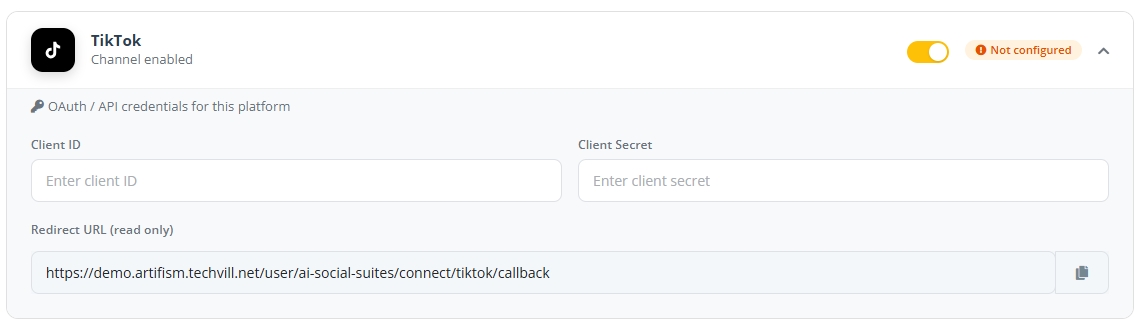
You will need to generate a Client ID and Client Secret.
Step 1: Create a TikTok Developer Account
- Go to the TikTok for Developers portal.
- Log in with your TikTok account.
- Click on My Apps and select Create New App.
Step 2: Configure Your App
- Select Platform: Choose Web.
- App Name: Enter a name (e.g., "Artifism Social Suite").
- Description: Briefly describe the app.
- Category: Choose "Social".
- App Icon: Upload your brand logo.
Required Products
To allow Artifism to post, you must add the correct products to your app: * TikTok Content Posting: This is essential for direct video publishing. * Login with TikTok: This allows users to authorize their accounts securely.
Step 4: Configure Redirect URI
- Go to the App Settings -> Redirect URL section.
- Copy the Redirect URL from Admin → Features → AI Social Suites → General Options and paste it here.
- Click Save.
Direct Post Scopes
Ensure the following scopes are enabled under Products -> TikTok Content Posting -> Direct Post:
* video.publish
* user.info.basic
Step 6: Get Your Credentials
- In the App Overview or Settings page, locate your:
- Client ID (sometimes called Client Key)
- Client Secret
- Copy these values.
Step 7: Connect to AI Social Suites
- Open your Artifism dashboard and go to Admin -> Features -> AI Social Suites -> General Options.
- Expand the TikTok card.
- Paste your Client ID and Client Secret.
- Click Save Configuration.
- Now click Connect New Account to authorize your TikTok account.
Action Required: App Audit & Review
TikTok has two distinct states for developer applications:
- Staging/Development: Your posts are restricted to Private mode (only you can see them).
- Production: Your posts can be seen by the public.
To make your posts public, you must click Submit for Review in the TikTok Developer Portal. TikTok will audit your application to ensure it complies with their terms before granting production access.
❓ Troubleshooting
Missing TikTok Content Posting product?
Ensure you have added this product to your app in the TikTok Developer portal. Without it, you can log in but you cannot publish videos.
Redirect URI error?
Ensure the URL matches exactly between TikTok and Artifism.
Videos are private on TikTok?
Your app is likely still in "Staging" mode. You need to complete the TikTok app review/audit to publish public content.