Facebook Messenger Channel Administration
This guide is for the Artifism platform administrator. It covers the server-level controls required before a chatbot owner can connect a customer-owned Meta app and Facebook Page.
Credential ownership
Artifism does not provide a platform-wide Meta App ID, App Secret, Verify Token, or Page Access Token. Each chatbot owner supplies credentials for their own Meta app and Page. The administrator enables the feature, runs the queues, and monitors the integration.
How the integration is divided
| Responsibility | Platform administrator | Chatbot owner |
|---|---|---|
| Enable Messenger connections | Yes | No |
| Configure Graph API host/version and queue cron | Yes | No |
| Create the Meta app and connect Pages | No | Yes |
| Store App Secret, Verify Token, and Page token | No | Yes, through Artifism's encrypted fields |
| Approve the optional Human Agent policy | Global safety switch only | Per verified Meta app |
| Assign support agents | No | Yes |
1. Prepare the production endpoint
Messenger webhooks must reach Artifism over public HTTPS. Before enabling the feature, confirm that:
APP_URLis the canonical public HTTPS URL, with no localhost address, private IP, duplicated slash, or temporary tunnel.- The certificate is valid and includes the complete chain. Do not disable TLS verification or use a self-signed certificate in production.
- The reverse proxy or web server forwards
GETcallback verification andPOSTwebhook requests to Laravel. - The webhook endpoint is not placed behind interactive login, HTTP Basic authentication, a CAPTCHA, or an IP rule that blocks Meta.
- Application time, queues, cache, and database are healthy.
2. Configure Messenger environment values
Add the Messenger settings to the production environment, using the Graph API version approved for this Artifism release and the customer's Meta apps:
META_MESSENGER_ENABLED=true
META_MESSENGER_GRAPH_BASE_URL=https://graph.facebook.com
META_MESSENGER_GRAPH_VERSION=v25.0
META_MESSENGER_VERIFY_TLS=true
META_MESSENGER_HUMAN_AGENT_ENABLED=false
META_MESSENGER_WEBHOOK_QUEUE=messenger-webhooks
META_MESSENGER_REPLY_QUEUE=messenger-replies
META_MESSENGER_PROFILE_QUEUE=messenger-profiles
v25.0 is the product's current example/default, not a permanent recommendation. Before changing it, check Meta's current version lifecycle and run the Messenger test suite against the new version.
After an environment change, refresh Laravel's configuration cache using the deployment process used by the site. Never expose .env or copy its contents into a ticket.
Recommended production limits
The product also provides bounded controls for webhook intake and delivery reliability. Keep the defaults unless load testing or an incident shows a reason to change them:
| Environment value | Default | Purpose |
|---|---|---|
META_MESSENGER_WEBHOOK_MAX_PAYLOAD_BYTES |
1048576 |
Reject oversized webhook bodies before JSON processing. |
META_MESSENGER_WEBHOOK_VERIFY_RATE_LIMIT |
30 |
Limit callback-verification requests. |
META_MESSENGER_WEBHOOK_RECEIVE_RATE_LIMIT |
6000 |
Limit webhook receive requests. |
META_MESSENGER_SEND_MAX_ATTEMPTS |
3 |
Bound retryable Messenger send attempts. |
META_MESSENGER_SEND_RETRY_BACKOFF |
60 |
Default retry delay in seconds when Meta provides no usable Retry-After. |
META_MESSENGER_CONNECTION_TEST_PENDING_TTL_SECONDS |
300 |
Expire a delivery test that never receives confirmation. |
META_MESSENGER_EVENT_CORRELATION_ATTEMPTS |
10 |
Temporarily defer a receipt that arrives before its outbound message can be correlated. |
META_MESSENGER_MAX_TEXT_LENGTH |
2000 |
Bound Messenger text replies. |
Do not increase payload, retry, or rate limits without checking memory, queue depth, Meta limits, and abuse exposure. META_MESSENGER_VERIFY_TLS must remain true in production.
3. Configure the channel queue cron
The shared chatbot-channel cron must process these Messenger queues:
messenger-webhooks— processes inbound messages, postbacks, echoes, delivery receipts, and read receipts.messenger-replies— sends AI, test, and human text replies.messenger-profiles— refreshes Messenger customer profile data.
Follow Chatbot Channels - Cron Job Setup to configure the per-minute worker route. Like AI Social Suites, the shared route processes its named queues and exits after the available jobs are drained. Supervisor is not required for this documented setup.
4. Enable the administrator controls
Open Admin Panel -> Configuration -> Feature Preference -> Chatbot -> Channel Integrations.
Configure the two Messenger switches:
- Turn on Enable Messenger Connections only after HTTPS and the queue cron are ready.
- Leave Human Agent extended reply window off until customers have the required Meta approval and the business has a manual-support compliance process.
- Save the feature preferences.
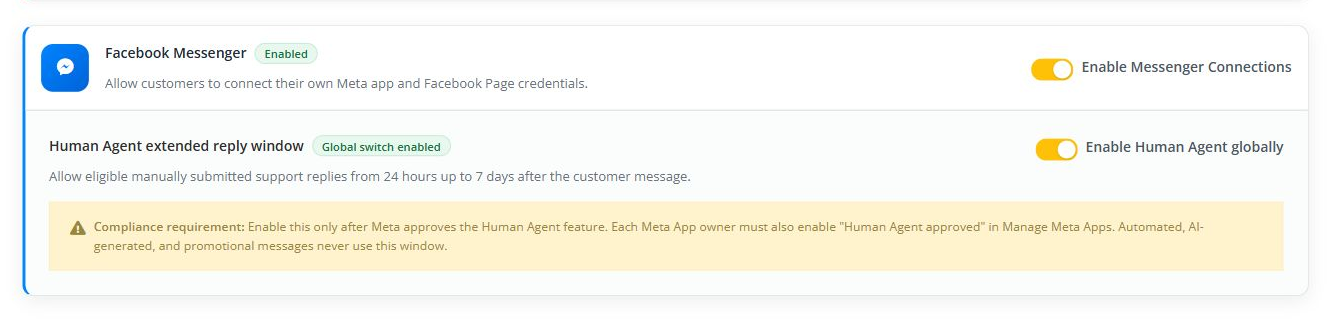
The screenshot shows the location of both controls in the live installation. Its enabled state is only the current test-installation state; production administrators must follow the approval and readiness rules above.
Turning off Messenger pauses the owner setup flow and channel processing; it does not erase customer credentials or Page connections.
5. Understand the webhook security contract
The shared callback has two different verification mechanisms:
- Meta sends a
GETchallenge. Artifism returns the challenge only whenhub.mode=subscribeand the exact customer-owned Verify Token matches. - Meta sends event payloads by
POST. Artifism calculates HMAC-SHA256 over the raw request body with that customer's Meta App Secret and compares it withX-Hub-Signature-256before parsing or queuing the event.
Artifism also rejects oversized bodies, malformed JSON, non-Page payloads, unknown Page IDs, and invalid signatures. Do not place the route behind middleware that rewrites the body. A CDN/WAF may proxy the request only if it preserves the raw body and signature header exactly.
Webhook events can be duplicated or arrive out of order. Artifism deduplicates accepted events and defers receipt correlation for a bounded number of attempts. A 200 EVENT_IGNORED response can be intentional when Messenger is globally paused, the Page is unknown/inactive, or the event is not actionable; it is not automatically evidence of a broken endpoint.
6. Understand the Human Agent safety gates
Artifism permits an extended manual-support reply only when all of these are true:
- The global administrator switch is on.
- The Meta app is verified in Artifism.
- The owner confirms Human Agent approved for that Meta app.
- The conversation is assigned to a human agent.
- The message is manually written for genuine customer support and is still inside Artifism's configured seven-day window.
AI and other automated replies remain limited to the standard 24-hour window. Extended replies must not be automated, promotional, or used to bypass Meta policy. Approval requirements and product labels can change, so the business must confirm the current rules in its own Meta App Dashboard before enabling the option.
7. Production monitoring
Monitor at least:
- queue depth, queue age, failed jobs, retry counts, and cron failures for all three Messenger queues;
- webhook verification failures, invalid signatures, rejected payloads, and rate-limit responses;
- Meta authentication, permission, Page subscription, delivery, and policy errors;
- inactive channels, repeated reconnects, and outbound delivery tests that remain pending;
- application error rate and webhook response latency.
Alert separately on permanent credential/policy errors and transient Meta failures:
- invalid or expired token, permission loss, or missing Page — stop blind retries and notify the owner to reconnect;
- HTTP
429or Meta rate-limit codes — respectRetry-Afterand watch queue growth; - Meta
5xx/temporary unavailability — use bounded retries; - ambiguous network failure after a send — investigate before manually resending because Meta may have accepted the first request.
For queue health, verify the cron after every deployment, keep failed jobs visible to operations staff, and alert when ready jobs remain queued for more than two cron intervals. An HTTP callback can return successfully while downstream handling is delayed if the webhook queue is backed up.
Do not log App Secrets, Verify Tokens, Page Access Tokens, full callback identifiers, or raw customer message bodies unless a documented retention policy explicitly permits it.
Administrator verification checklist
- Public
APP_URLuses valid HTTPS. -
META_MESSENGER_ENABLED=trueis present in the effective runtime configuration. - The Graph API version is supported and tested.
- TLS verification remains enabled.
- The per-minute cron processes all three Messenger queues.
- The administrator feature switch is on.
- Human Agent remains off unless approval and compliance controls are in place.
- A test owner can open Add Channel -> Facebook Messenger.
- Queue, webhook, authentication, and delivery failures are monitored.
Troubleshooting
| Symptom | Check |
|---|---|
| Messenger is unavailable in Add Channel | Effective META_MESSENGER_ENABLED, administrator switch, configuration cache, and the user's Chatbot access. |
| Meta cannot verify any callback | Public HTTPS, canonical APP_URL, proxy routing, certificate chain, and whether security middleware blocks Meta's GET request. |
Valid challenge works but signed events return 401 |
Confirm the correct App Secret is saved for that shared callback and the proxy/WAF preserves the raw body plus X-Hub-Signature-256. |
| Incoming test never completes | Cron history, the messenger-webhooks queue, the exact current test code, required webhook fields, Page subscription, active app callback, and application logs. |
| Test reply stays pending or fails | Cron history, the messenger-replies queue, Page token validity, 24-hour window, Meta permissions, and delivery webhook events. |
| Duplicate conversation/message symptoms | Confirm queue workers are not bypassing the normal webhook intake and inspect event hashes/idempotency records before replaying payloads. |
| Delivery/read status arrives before the send record | Check bounded event-correlation retries and queue latency; do not create placeholder outbound messages manually. |
| Names do not update | Cron history, the messenger-profiles queue, and token permission. Do not treat a missing profile name as a message-delivery failure. |
| Extended reply is unavailable | Global switch, verified app, per-app approval confirmation, assignee, and current reply-window state. |
Security and incident response
- Require multi-factor authentication for Meta and Artifism administrators.
- Keep secrets in a password manager or secrets vault; never in source control, screenshots, chat, or email.
- Restrict administrator and production-log access to the smallest practical group.
- If an App Secret or Page token is exposed, rotate it in Meta and Artifism, then re-verify every affected Page and repeat both message tests before activation.
- Record the incident time, affected apps/Pages, revoked credentials, verification results, and owner notification.
Continue with the customer-facing Messenger overview and owner setup guide.