Facebook Messenger Channel Overview
Artifism connects a chatbot to one or more Facebook Pages through a customer-owned Meta app. Incoming Page messages can be handled by AI, transferred to a selected support agent, and returned to AI when the issue is complete.
Start here
The platform administrator must first complete Messenger channel administration. A chatbot owner then follows Messenger owner setup. Support staff use Messenger team member operations.
Every Artifism screenshot in this guide is real
The screenshots below were captured from the live Artifism installation. Private customer, Page, agent, App ID, Page ID, and callback values are blurred or masked; the controls and system states are not reconstructed.
The connection model
Facebook user
    -> Facebook Page
    -> customer-owned Meta app and Page subscription
    -> shared Artifism app callback
    -> one Artifism Messenger channel for that Page
    -> AI or assigned support agent
Follow the screens in this order
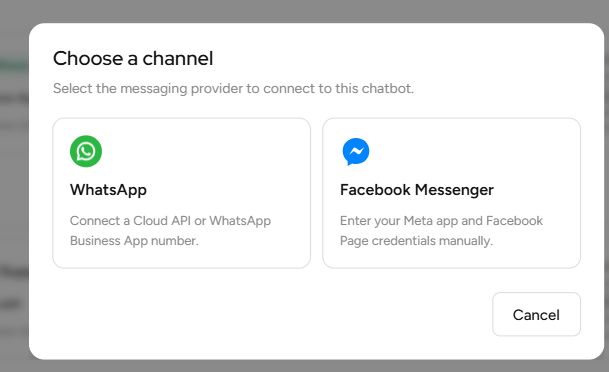
1. Choose Facebook Messenger
The owner starts from the chatbot's Channels page and chooses Facebook Messenger.
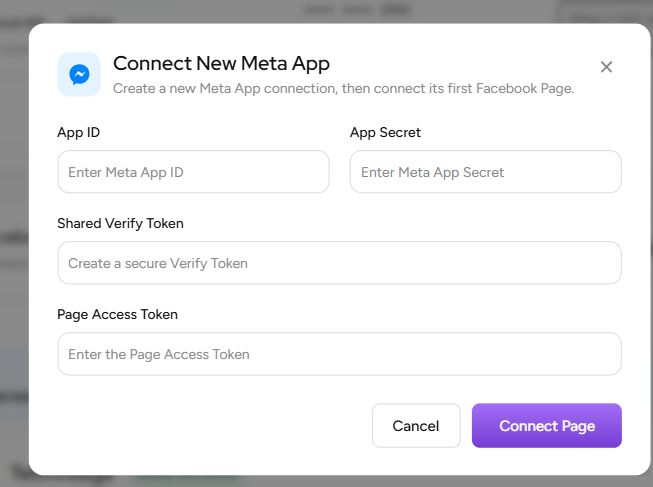
2. Connect the first Page
For the first Page under a Meta app, Artifism asks for the App ID, App Secret, shared Verify Token, and Page Access Token.
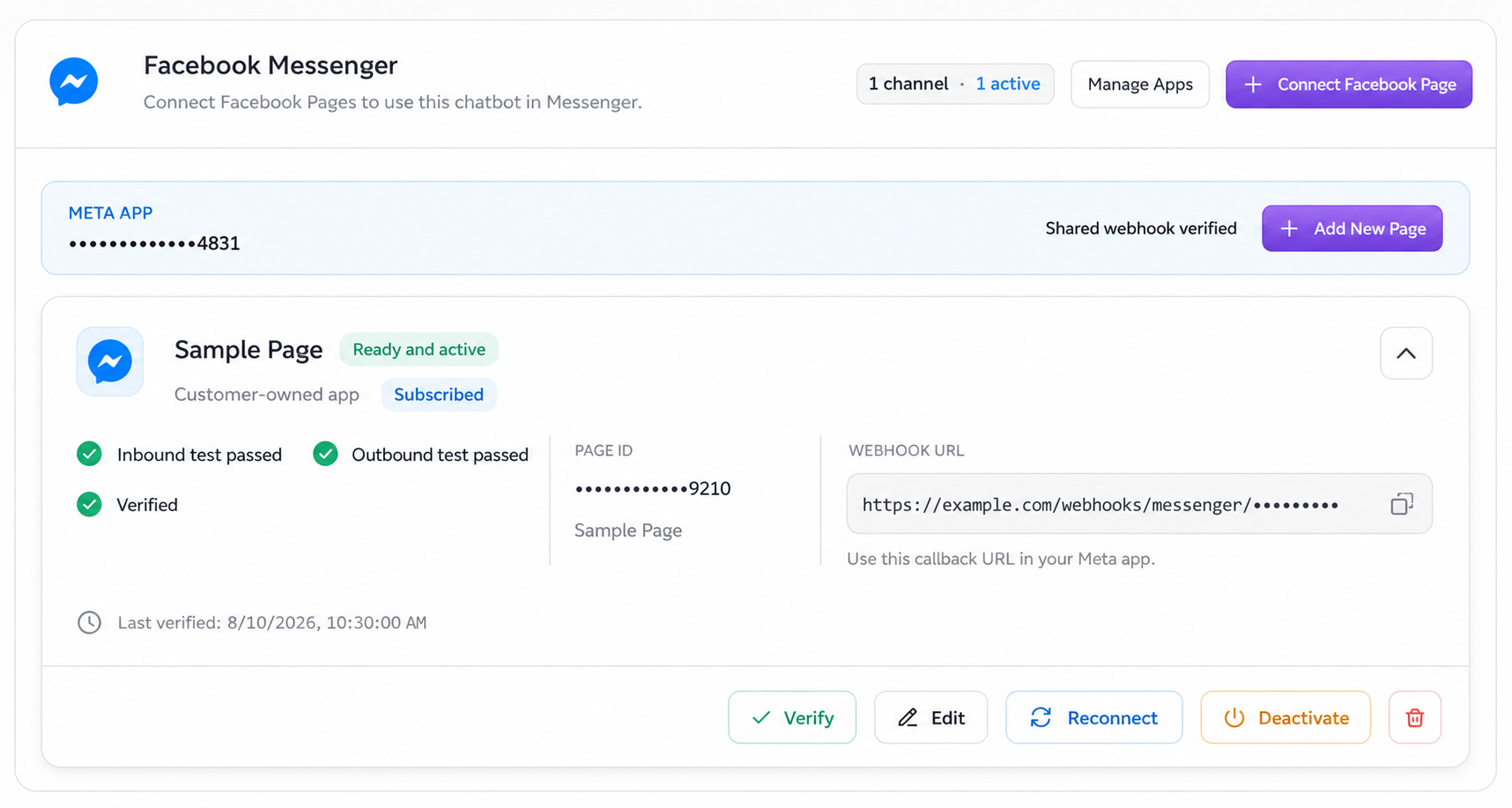
3. Finish verification and activation
After Meta accepts the shared callback and the inbound/outbound tests pass, the Page card shows Ready and active.
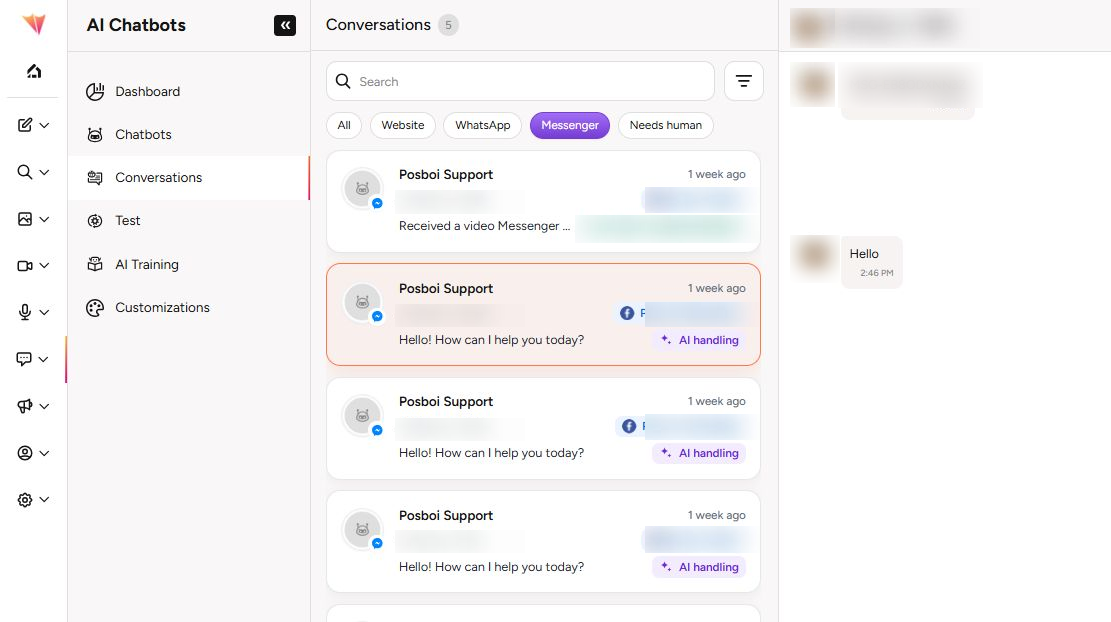
4. Work from Conversations
Agents open Conversations and select the Messenger filter. The list shows which conversations are in AI handling and which have been transferred to a human.
- A Meta app is connected to Artifism once.
- Its App Secret and Verify Token are stored at the app-connection level.
- Each Facebook Page has its own Page Access Token and its own Artifism channel.
- Additional Pages under the same Meta app reuse the saved App Secret, Verify Token, and shared callback.
- A Page cannot be connected as another active Artifism channel at the same time.
Roles
| Role | Main responsibilities |
|---|---|
| Platform administrator | Enable Messenger, configure the Graph API, run workers, and control the global Human Agent safety switch. |
| Chatbot owner | Own the Meta app/Page, connect credentials, configure webhooks, verify and activate Pages, assign agents, and rotate credentials. |
| Team member | Work only assigned Messenger conversations, send manual text replies during an allowed window, and resume AI after resolving the issue. |
What owners need before setup
- Administrator access to the correct Facebook Page and Meta app.
- A public production Artifism URL with valid HTTPS.
- A Meta app that can use Messenger, plus a Facebook Page connected to it.
- An App ID, App Secret, strong Verify Token, and Page Access Token.
- Required permissions for messaging and Page subscription management.
- A password manager or secrets vault.
- A support plan: selected agents, handoff message, confidence threshold, and response-time target.
For public production users, the Meta app may also require business verification, App Review, Advanced Access, and Live mode. Test roles can behave differently while an app remains in development mode.
Supported operational flow
- The owner connects the first Page with a new Meta app connection.
- Meta verifies the app-level callback and subscribes the required webhook fields.
- The owner sends an exact inbound test code from a personal Facebook account.
- Artifism sends a test reply and waits for Meta delivery confirmation.
- The owner activates the Page channel.
- AI handles normal Messenger messages.
- Artifism or the owner transfers a conversation to an allowed human agent.
- The agent sends a manual text reply and selects Resume AI when finished.
Reply windows and limits
| State | What Artifism permits |
|---|---|
| Standard window | AI and human replies for less than 24 hours after the customer's latest message. |
| Human Agent window | Optional manual human support after the standard window and before Artifism's seven-day limit, only when all approval and safety gates are enabled. |
| Closed | No reply. Wait for the customer to send a new message. |
The Messenger human composer sends text only in this release, up to 2,000 characters. Incoming attachments can appear in the conversation when Artifism successfully receives and stores a safe attachment reference, but agents cannot upload a new Messenger attachment from this composer.
Human Agent is not a marketing window
Extended replies are for manually written customer support. They cannot be automated or promotional. Confirm current Meta policy and approval requirements for the business's own app.
Supported messages and events
| Direction or event | Current Artifism behavior |
|---|---|
| Customer text and quick replies | Stored as inbound conversation messages and eligible for AI handling when the channel is active. |
| Messenger postbacks | Stored as inbound text using the postback title or payload. |
| Customer attachments and reactions | Stored as inbound context when Meta supplies a safe attachment reference or reaction data. |
| Agent and AI replies | Text only, up to 2,000 characters. Artifism does not upload outbound Messenger media in this release. |
| Message echoes | Used to correlate Page-side sends; an echo does not refresh the customer-service window. |
| Delivery and read receipts | Update the most advanced known message state when Meta sends them. |
Messenger identifies a person with a Page-scoped ID. The same person messaging two different Facebook Pages can therefore appear as two separate channel conversations. Artifism does not use Messenger to start an unsolicited conversation; a customer message must establish an allowed reply window.
Webhook delivery can be repeated or arrive out of order. Artifism generates stable event identities, ignores duplicate intake, and temporarily retries receipt correlation when a delivery/read event arrives before the corresponding outbound message is fully recorded. Agents should still avoid pressing Send repeatedly while a reply is pending.
Statuses owners will see
- Shared webhook verified — Meta accepted the app callback.
- Subscribed — the Page is subscribed to the Meta app.
- Inbound test passed — Artifism received the exact setup code.
- Outbound test passed — Artifism received Meta's delivery confirmation for the test reply.
- Verified — credentials and required connection checks passed.
- Ready and active — setup is complete and AI replies can operate.
- Cleanup pending — Artifism could not remove the Meta Page subscription; manual cleanup may still be required.
Security model
- Artifism encrypts saved app and Page credentials and does not display stored secret values again.
- Callback URLs identify a connection and should be treated as sensitive operational data even though Meta must be able to reach them.
- App Secrets, Verify Tokens, and Page Access Tokens must never appear in screenshots, tickets, source control, or documentation.
- Rotating app-level credentials affects every Page connected through that Meta app.
- Removing a Meta app from Artifism is blocked until its Pages are disconnected.
Choose the next guide
- New connection: Messenger owner setup
- Credential rotation, new Pages, handoff, and removal: Messenger owner operations
- Daily support workflow: Messenger team member operations